
Updated · Sources & corrections
In this guide
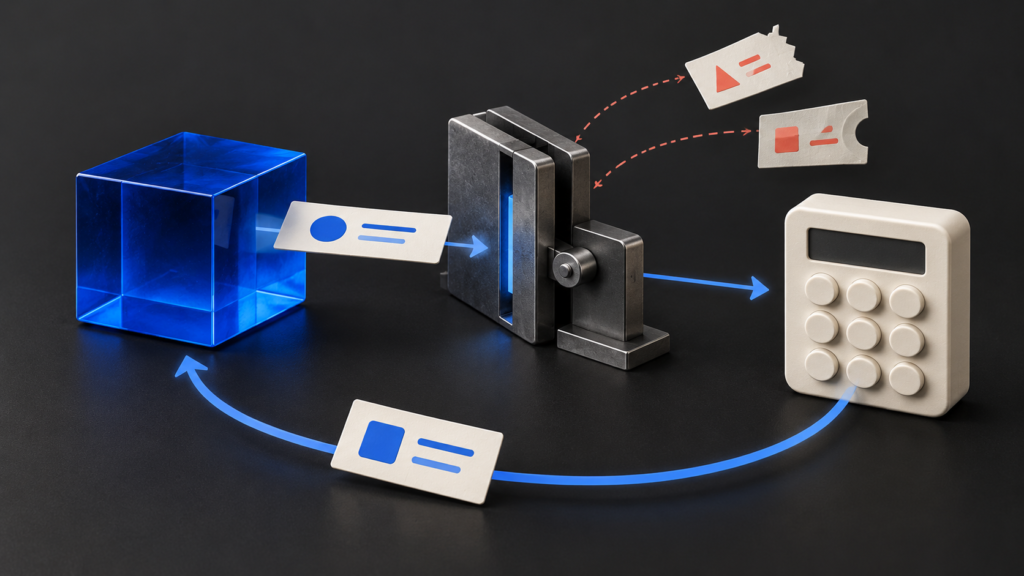
If your application prints a tool-call object and stops, it has completed only the first part of the exchange. This guide shows a small, non-streaming Python example using a fixed arithmetic tool. It does not grant the model access to files, shell commands or external services.
Scope and prerequisites
Use Python 3.10 or later, an Ollama server reachable at 127.0.0.1:11434, and an installed local checkpoint that supports tools. Use the exact tag from ollama list. The code uses the standard library and the native chat endpoint; it is not an OpenAI-compatible endpoint example. For installation and server configuration, start with our Ollama complete guide.
Ollama’s official tool-calling documentation describes the conversation exchange. The validation rules and fixed limits below are application choices for this demonstration. A tool schema guides generation; the application still checks the returned arguments.
The contract to preserve
| Stage | Application responsibility |
|---|---|
| Assistant proposes calls | Check the completed native response and every call before executing the turn. |
| Tool execution | Accept only the named arithmetic operation and bounded integer arguments. |
| History update | Retain the full assistant message, then add one tool result per accepted call. |
| Next request | Send the updated history. Stop on a completed text answer or an explicit limit/error. |
A turn containing tool calls takes precedence over incidental text in that turn. Do not treat that text, or a separate thinking field, as proof that the operation has finished. Our empty-content and thinking-field diagnostic covers response classification separately.
A bounded Python implementation
Save this as tool_loop.py. It permits at most four model requests and four tool calls in each response. It rejects unknown tools, extra keys, stringified arguments, booleans and out-of-range values. All calls in a turn are validated before the arithmetic starts. These limits bound this example’s work; they are not a general-purpose sandbox.
import json
import urllib.request

TOOLS = [{"type": "function", "function": {
    "name": "multiply", "description": "Multiply two bounded integers.",
    "parameters": {"type": "object", "properties": {
        "a": {"type": "integer"}, "b": {"type": "integer"}},
        "required": ["a", "b"], "additionalProperties": False}
}}]


def validate(call):
    if not isinstance(call, dict):
        raise ValueError("Tool call must be an object")
    fn = call.get("function")
    if not isinstance(fn, dict) or fn.get("name") != "multiply":
        raise ValueError("Unknown tool; nothing executed")
    args = fn.get("arguments")
    if not isinstance(args, dict) or set(args) != {"a", "b"}:
        raise ValueError("Expected exactly a and b")
    if any(type(args[k]) is not int or abs(args[k]) > 10000
           for k in ("a", "b")):
        raise ValueError("Arguments must be integers from -10000 to 10000")
    return args


def run_loop(chat, model):
    messages = [{"role": "user", "content":
                 "Use multiply to calculate 7 times 8, then answer."}]
    for _ in range(4):  # At most four model requests, not four tool executions.
        reply = chat({"model": model, "messages": messages,
                      "tools": TOOLS, "stream": False})
        if not isinstance(reply, dict) or reply.get("done") is not True:
            raise ValueError("Incomplete or malformed response")
        if reply.get("error"):
            raise ValueError("Server returned an error")
        message = reply.get("message")
        if not isinstance(message, dict) or message.get("role") != "assistant":
            raise ValueError("Expected an assistant message")
        calls = message.get("tool_calls", [])
        if not isinstance(calls, list):
            raise ValueError("tool_calls must be an array")
        if not calls:
            text = message.get("content")
            if reply.get("done_reason") != "stop" or not isinstance(text, str) or not text.strip():
                raise ValueError("No completed final answer")
            return text
        if len(calls) > 4:
            raise ValueError("Too many calls in one turn")
        # Validate the entire turn before executing any call.
        arguments = [validate(call) for call in calls]
        messages.append(message)  # Preserve thinking and tool-call fields.
        for args in arguments:
            value = args["a"] * args["b"]  # Only this fixed, pure operation.
            messages.append({"role": "tool", "tool_name": "multiply",
                             "content": json.dumps({"result": value})})
    raise RuntimeError("Model-request limit reached; no final answer")


def local_chat(payload):
    request = urllib.request.Request(
        "http://127.0.0.1:11434/api/chat",
        data=json.dumps(payload).encode("utf-8"),
        headers={"Content-Type": "application/json"}, method="POST")
    with urllib.request.urlopen(request, timeout=120) as response:
        return json.load(response)


if __name__ == "__main__":
    import sys
    if len(sys.argv) != 2:
        raise SystemExit("Usage: python tool_loop.py EXACT_LOCAL_MODEL_TAG")
    print(run_loop(local_chat, sys.argv[1]))
Run it with python tool_loop.py EXACT_LOCAL_MODEL_TAG, replacing the final argument with your installed tools-capable tag. This request does not download a model. A model may answer without selecting the tool; that is not evidence the tool was executed. For missing tags or an incorrect server path, use the model-not-found diagnostic.
The server response is read as one JSON document because the request explicitly disables streaming. For streaming clients, assemble the complete tool-call fields before dispatch; do not run this logic on individual chunks. See our streaming JSON guide for that different parsing problem.
How to interpret failures
| Result | Meaning and next step |
|---|---|
| Unknown tool or invalid arguments | The example stops without guessing a replacement. Inspect the call and schema; do not use eval or dynamic attribute lookup to dispatch it. |
| Model-request limit reached | No final answer was accepted within four requests. Inspect the conversation for repeated calls before changing the budget. |
| No completed final answer | The last response was empty or ended for another reason. Do not label a truncated answer as success. |
| HTTP error, timeout or connection error | The transport exception stops the script. Check the local service and model. There is no automatic retry or paid-service fallback. |
| Answer text but no tool calls | The model chose a direct answer. Track tool results separately if your task requires confirmed execution. |
The Python urllib documentation describes the request interface used here. Its timeout is not a hard wall-clock budget for an entire agent job. Production applications also need cancellation, resource limits and a policy for how errors are recorded.
Fixture checks and honest limits
On 24 October 2026, seven local unittest cases passed against constructed native-response dictionaries: multiple calls with retained history, unknown tool rejection, invalid argument cases, the four-request limit, the per-turn call limit, incomplete/empty/truncated replies and a malformed tool-call list. The exact article code was syntax-checked. No live Ollama server or model was exercised; these checks do not measure model reliability, tool selection or latency.
This arithmetic tool has no side effects. Before substituting a file writer, payment operation or external API, add explicit authorization, scoped credentials, idempotency and an appropriate execution boundary. A loop counter and a schema do not supply those controls. Keep the local endpoint local; exposing it publicly does not fix tool dispatch.
Next, run the fixture checks in your own integration, then try a harmless local-model request while recording the exact checkpoint and server version. Confirm that every tool result is tied to the preserved assistant turn before adding more tools.
Sources and verification scope
AI Models News checked the linked official API and Python references on 24 October 2026. The example is original application code with local fixture validation, not a claim of live model testing. Competitor tutorials informed topic-gap research, not technical claims. Read our sourcing and correction policy.