
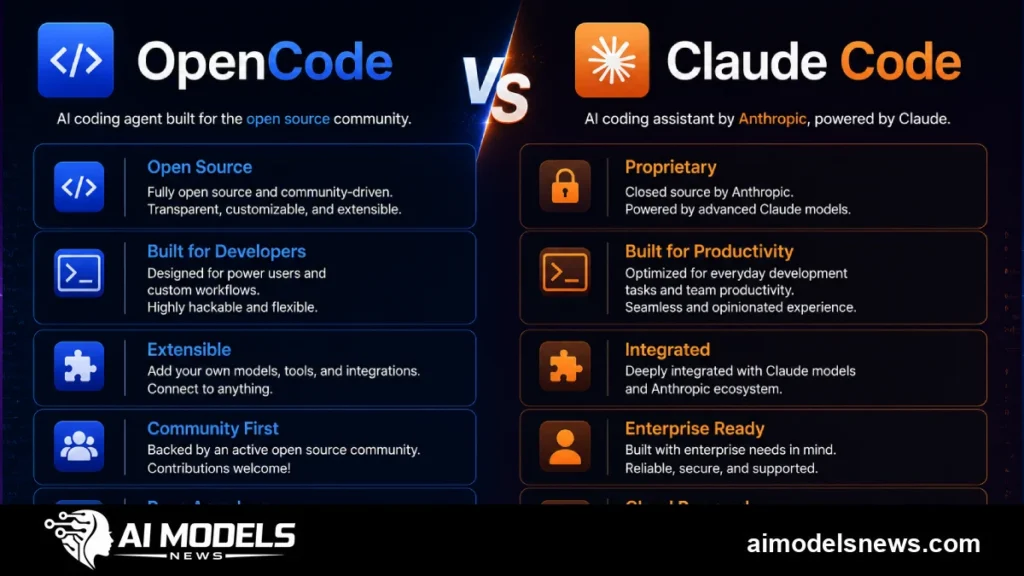
Choosing between opencode vs claude code comes down to one question: do you want an open-source terminal agent that works with any model provider, or Anthropic’s native agent tuned specifically for Claude? Both tools live in your terminal and can read, edit, and run code across your project, but they take very different approaches to models, pricing, and extensibility.
This comparison sits within our broader coverage of AI developer tools, where we track how coding agents are reshaping everyday engineering work. Below we break down installation, provider flexibility, agent behavior, permissions, and configuration so you can pick the right fit.
If you are short on time, the table below summarizes the headline differences before we go deeper into each area.
| Aspect | OpenCode | Claude Code |
|---|---|---|
| License | Open source (MIT-style, community driven) | Proprietary, closed source |
| Model support | Any provider: Anthropic, OpenAI, Google, Groq, local models and more | Anthropic Claude models only |
| Pricing model | Free tool; you pay only your provider’s API costs | Subscription (Pro/Max plans) or Anthropic API billing |
| Extensibility | Custom agents, plugins, MCP servers, configurable keybinds | Custom slash commands, hooks, subagents, MCP servers |
| Offline options | Yes — fully offline with local models via Ollama or LM Studio | No — requires an internet connection to Anthropic’s API |
What Are OpenCode and Claude Code?
OpenCode in brief
OpenCode is an open-source terminal-based AI coding agent built around provider neutrality. It connects to roughly a dozen or more model providers through a unified interface, and it can also talk to any OpenAI-compatible endpoint.
Because the code is open, you can audit exactly what gets sent to a model and how tool calls are executed. That transparency matters to teams with strict compliance or data-residency requirements.
Claude Code in brief
Claude Code is Anthropic’s official terminal agent, designed from the ground up around Claude’s strengths in long-context reasoning and tool use. It ships with a carefully tuned system prompt, built-in tools for file editing and shell execution, and native support for Anthropic features like prompt caching.
It is closed source, but Anthropic has layered a rich extension system on top: hooks, slash commands, subagents, and Model Context Protocol (MCP) servers. If you want to try it, our guide on how to install Claude CLI walks through setup step by step.
Installation and Setup
Installing OpenCode
OpenCode offers several install paths. The quickest is the official install script, which works on macOS, Linux, and Windows via WSL.
curl -fsSL https://opencode.ai/install | bashAlternatively, you can install it through npm or other package managers if you prefer to manage versions yourself.
npm install -g opencode-aiAfter installation, run opencode in a project directory and use the built-in login flow to connect a provider. The first-run experience guides you through choosing a default model.
Installing Claude Code
Claude Code is distributed through npm and requires Node.js 18 or newer. A single global install gets you the claude command.
npm install -g @anthropic-ai/claude-codeLaunch it inside a project with claude and authenticate using either a Claude subscription or an Anthropic API key. Subscription auth is the cheaper route for heavy interactive use, while API keys suit automation and CI pipelines.
Provider and Model Flexibility
OpenCode: use any LLM, including local models
This is OpenCode’s defining advantage. You can point it at Anthropic, OpenAI, Google, Mistral, Groq, or any OpenAI-compatible API, and switch models mid-session. If Claude is great at refactoring but you prefer another model for quick edits, you are free to mix and match.
Local model support is where OpenCode truly stands apart. Pair it with Ollama and you can run a capable coding model entirely on your own hardware, with no API key and no data leaving your machine.
ollama run qwen2.5-coder:32bWith Ollama serving on its default local port, you configure OpenCode to use the local endpoint and work fully offline. Expect a noticeable quality gap versus frontier cloud models, but for privacy-sensitive codebases the trade-off is often worth it.
Claude Code: Anthropic-only, by design
Claude Code only runs Anthropic models, typically a choice between the larger Opus-class model and the faster Sonnet-class model. There is no way to plug in a competitor’s model or a local one.
The upside is depth of integration. Anthropic tunes the agent loop, prompts, and caching behavior specifically for its own models, which tends to produce consistent, predictable behavior across sessions.
Agent Capabilities and Daily Workflow
Both tools can explore a codebase, edit multiple files, run shell commands, and iterate on failing tests. In day-to-day use, the experience is more similar than the marketing suggests.
Differences show up in the details. Claude Code ships with mature subagent support, a plan mode for read-only exploration, and a task system that tracks multi-step work. OpenCode counters with two built-in agents (a full-access build agent and a read-only plan agent) plus the ability to define your own custom agents in configuration.
Both support MCP servers for external tools and data sources, so connecting a database, issue tracker, or internal API works in either. Community benchmarks suggest frontier Claude models still lead on complex multi-file reasoning, but OpenCode closes much of that gap precisely because you can run those same Claude models inside it.
Permissions and Safety Model
How Claude Code handles permissions
Claude Code asks for approval before running potentially risky actions like editing files or executing shell commands. You can allow individual actions once, allow a tool for the whole session, or pre-approve specific commands in settings files.
For unattended runs there is a bypass mode, but Anthropic clearly warns against using it outside sandboxed environments. The defaults are conservative and sensible for most developers.
How OpenCode handles permissions
OpenCode takes an agent-scoped approach. Its default build agent can edit and execute freely, while the plan agent is restricted to read-only exploration until you approve a switch.
You can fine-tune this in the config file, setting per-tool rules such as always allowing reads but prompting before bash commands. It is slightly less granular than Claude Code’s session prompts out of the box, but more programmable for teams that codify their policies.
Configuration Files and Extensibility
OpenCode configuration
OpenCode uses a JSON configuration file, typically opencode.json at the project root or in your home config directory. A minimal project config that pins a provider and model looks like this:
{
  "$schema": "https://opencode.ai/config.json",
  "provider": "anthropic",
  "model": "claude-sonnet-4-5"
}
Beyond providers and models, the config covers custom agents, MCP servers, keybinds, formatters, and permission rules. Markdown-based instruction files let you give the agent project-specific guidance, similar in spirit to Claude Code’s memory files.
Claude Code configuration
Claude Code centers configuration on the CLAUDE.md file, a Markdown document at the project root that the agent reads automatically. It is the standard place to document build commands, coding conventions, and architectural notes.
Structured settings live in JSON settings files at the user and project level, covering permissions, environment variables, and hooks that run shell commands on events like tool calls. Teams often check these into version control so every developer gets the same agent behavior.
Cost and Pricing in Practice
OpenCode itself costs nothing, but the models do. A developer running frontier cloud models through API billing can expect to spend anywhere from a few dollars to a few dozen dollars per day depending on intensity, roughly in line with what the same usage costs through any API client.
Claude Code flattens that into a subscription: the Pro plan covers moderate use and the Max plans cover heavy daily use, both at fixed monthly prices. For predictable budgeting, subscriptions win; for cost optimization, OpenCode lets you route cheap tasks to cheap models and reserve expensive ones for hard problems.
Running local models through OpenCode and Ollama drops marginal cost to zero after hardware, though you pay in quality and speed. It is a realistic option for boilerplate generation, simple edits, and code you cannot send to a third party.
Which Teams Should Choose Which?
Neither tool is universally better — the right choice depends on your constraints. Here is a practical way to decide.
- Choose OpenCode if your team needs multi-provider flexibility, wants to experiment with local models, or must audit the agent’s source code for compliance.
- Choose OpenCode if you want to optimize spend by mixing cheap and premium models, or if you are already standardized on a non-Anthropic provider.
- Choose Claude Code if your team is all-in on Claude and wants the most polished, best-tuned experience for those models with minimal setup.
- Choose Claude Code if predictable subscription billing, official vendor support, and mature features like hooks and subagents matter more than provider choice.
It is also worth noting that these tools are not mutually exclusive. Some developers run Claude Code for deep reasoning sessions and keep OpenCode configured with a local model for quick, private edits. If you are also weighing Google’s entry in this space, our Gemini CLI vs Claude Code comparison covers that pairing in similar detail.
Bottom line
OpenCode wins on freedom: open source, any provider, local models via Ollama, and a config file that bends to your workflow. Claude Code wins on polish: a tightly integrated agent that squeezes the most out of Anthropic’s models with minimal configuration.
Start with your constraint. If it is budget control, privacy, or provider choice, install OpenCode. If it is getting the best Claude experience with official support and flat pricing, install Claude Code — and do not be afraid to run both.